mirror of
https://github.com/lalifeier/IPTV.git
synced 2025-12-16 23:10:57 +08:00

105 lines
4.2 KiB
Markdown
105 lines
4.2 KiB
Markdown

|
||
|
||
## ⚠️ 警告
|
||
|
||
- **本项目出于个人兴趣,仅供学习使用,禁止用于商业化活动。**
|
||
- **直播源均来自网络,仅供学习交流使用,未经版权方同意不得商用。因私自商用引发的问题,本人概不负责,感谢理解!**
|
||
- **请批判性看待部分电视节目内容,节目观点仅代表主持人与嘉宾,不代表作者立场。**
|
||
- **如本仓库中部分内容存在侵权行为,请留言联系我删除。**
|
||
|
||
---
|
||
|
||
## 🔗 订阅链接
|
||
|
||
- **TXT 订阅链接**
|
||
- `https://proxy.lalifeier.eu.org/https://raw.githubusercontent.com/lalifeier/IPTV/main/txt/IPTV.txt`
|
||
|
||
- **M3U 订阅链接**
|
||
- `https://proxy.lalifeier.eu.org/https://raw.githubusercontent.com/lalifeier/IPTV/main/m3u/IPTV.m3u`
|
||
|
||
- **酒店源 TXT 订阅链接**
|
||
- `https://proxy.lalifeier.eu.org/https://raw.githubusercontent.com/lalifeier/IPTV/main/txt/hotel/全国.txt`
|
||
|
||
- **组播源 TXT 订阅链接**
|
||
- `https://proxy.lalifeier.eu.org/https://raw.githubusercontent.com/lalifeier/IPTV/main/txt/udpxy/全国.txt`
|
||
|
||
- **聚合直播源 订阅链接**
|
||
- `https://proxy.lalifeier.eu.org/https://raw.githubusercontent.com/lalifeier/IPTV/main/m3u/Live.m3u`
|
||
|
||
- **虎牙直播源 订阅链接**
|
||
- `https://proxy.lalifeier.eu.org/https://raw.githubusercontent.com/lalifeier/IPTV/main/m3u/huya.m3u`
|
||
|
||
- **斗鱼直播源 订阅链接**
|
||
- `https://proxy.lalifeier.eu.org/https://raw.githubusercontent.com/lalifeier/IPTV/main/m3u/douyu.m3u`
|
||
|
||
- **YY直播源 订阅链接**
|
||
- `https://proxy.lalifeier.eu.org/https://raw.githubusercontent.com/lalifeier/IPTV/main/m3u/yy.m3u`
|
||
---
|
||
|
||
## 📚 使用教程
|
||
|
||
### 1️⃣ 基于安卓系统的智能电视/电视盒子
|
||
|
||
1. 在智能电视/电视盒子上安装 DIPY 直播 APP:[点我下载](http://x-x-xxx.github.io/diyp/DIYP%E5%BD%B1%E9%9F%B3%E7%BB%8F%E5%85%B8%E7%89%88.apk)
|
||
2. 添加 `TXT` 订阅链接(若不方便输入可以考虑使用外接键盘或者一些手机遥控软件)
|
||
- **使用订阅链接实现自动更新**
|
||
- 遥控器按:【设置】键 — 选择【接口设置】—【节目地址】
|
||
- 填入上面提供的 TXT 订阅链接
|
||
- 重启后生效
|
||
- **手动添加直播源**
|
||
- 遥控器按:【设置】键 — 选择【显示设置】—【自定义源】
|
||
- 使用电脑等设备访问 WEB 控制台
|
||
- 添加分类(如央视、卫视、港澳台)并在对应分类填入相应的直播源
|
||
- 添加后 DIPY APP 会立刻刷新,即可观看
|
||
|
||
3. 最后设置开机自启动即可(可选)
|
||
|
||
### 2️⃣ Apple TV 和 APTV
|
||
|
||
1. 在 App Store 下载 [**Apple TV**](https://apps.apple.com/us/app/apple-tv/id1174078549) 或 [**APTV**](https://apps.apple.com/us/app/aptv/id1630403500) 软件
|
||
2. 添加 `M3U` 订阅链接
|
||
|
||
|
||
### 3️⃣ Jellyfin、Emby、Plex 等流媒体管理软件
|
||
|
||
1. 添加 `M3U` 订阅链接
|
||
2. 添加指南数据源:选择 `XmlTV`,添加此网址:`https://raw.githubusercontent.com/lalifeier/IPTV/main/e.xml`
|
||
|
||
### 4️⃣ Windows
|
||
|
||
1. 使用 Potplayer 播放器播放 `M3U` 文件即可
|
||
2. M3U 文件:[点击下载](https://proxy.lalifeier.eu.org/https://raw.githubusercontent.com/lalifeier/IPTV/main/m3u/IPTV.m3u)
|
||
3. Potplayer 播放器:[点击下载](http://potplayer.tv/)
|
||
|
||
---
|
||
|
||
## ❇️ 参考资料
|
||
|
||
- 直播源
|
||
- <https://epg.pw/test_channel_page.html>
|
||
- [iptv.org](https://github.com/iptv-org/iptv)
|
||
- [YueChan/Live](https://github.com/YueChan/Live)
|
||
- [YanG-1989/m3u](https://github.com/YanG-1989/m3u)
|
||
- [fanmingming/live](https://github.com/fanmingming/live)
|
||
- [ChiSheng9/iptv](https://github.com/ChiSheng9/iptv)
|
||
- [joevess/IPTV](https://github.com/joevess/IPTV)
|
||
- EPG
|
||
- [112114.xyz](https://diyp1.112114.xyz)
|
||
- [epg.51zmt.top:8000](http://epg.51zmt.top:8000/)
|
||
|
||
---
|
||
|
||
## 🌟 欢迎星标
|
||
|
||
[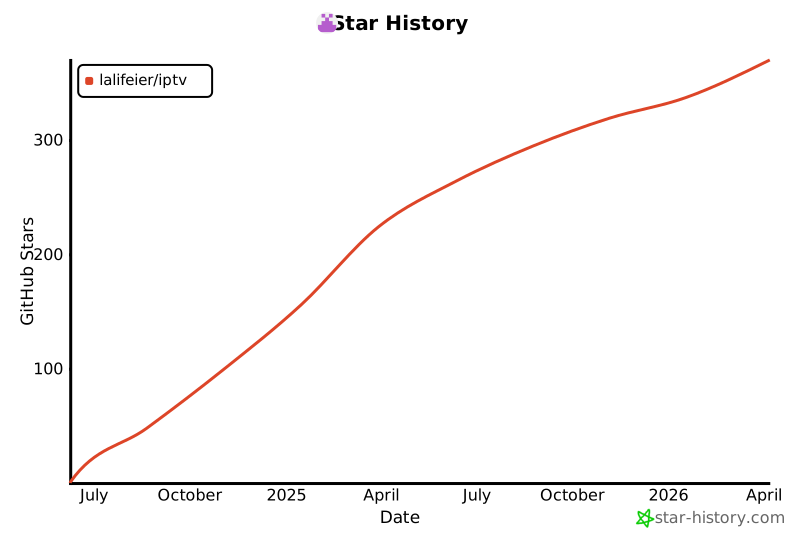](https://star-history.com/#lalifeier/IPTV)
|
||
|
||
---
|
||
|
||
## 💹 访问量统计
|
||
|
||

|
||
|
||
---
|
||
|
||
Last deployment time: 2025-12-15 05:31:17 UTC
|